

I’ve tried half a dozen times trying to build an AI that could answer questions across my entire ad account.
These were the requirements.
Answer quickly, and accurately.
Live data: Updated every day in the morning
Track performance across different attribution models
Be able to review engagement metrics for each creative.
See the creatives itself as a link that I can view and embed
Descriptions of the creatives that are searchable
Use AI tags for all creatives. (type, format, angle, hook, etc.) that are MECE
Facial tracking recognition to group by creator
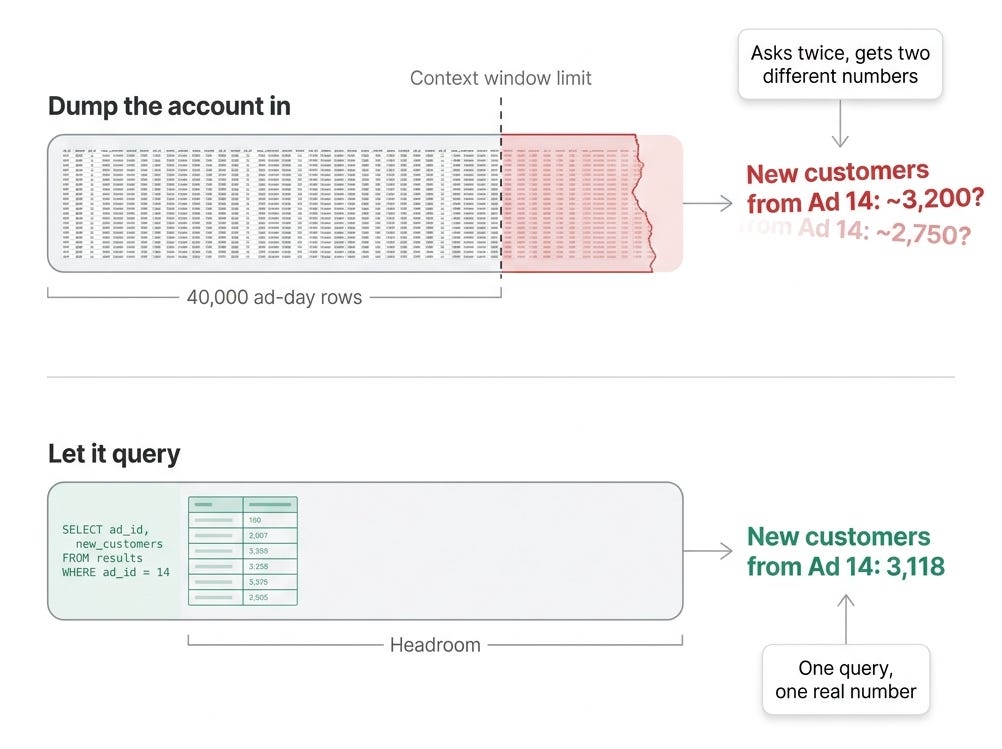
But the more data I added the more AI hallucinated as I was building.
What finally fixed it wasn’t a better prompt or automation system. It was two things working together, and the combination is the whole point of this post.
I put the data into a real database with a clean schema, and I let Claude Code write actual SQL against it (sending reports to slack) instead of asking a model to eyeball a pile of exports.
Then I built a visual analysis for repeat queries or where text answers didn’t cut it.
That’s the unlock. The AI stops guessing because it can write queries to isolate specific data instead of parsing large data sets as an LLM and pair that with a dashboard to see the results, and I can now ask almost anything about the account and get a real response.
I built this around the individual ad creative as the unit. Each ad carries its own lifecycle, its spend and revenue split into new versus returning customers, a transcript of what it says, a description of what it shows, who is on screen in it, and how it decays day by day. The data gets in either through a CSV importer (old way + for testing) that auto-detects Northbeam, TripleWhale, or Meta exports, and an automated pipeline that pulls on a schedule and generates the AI tags.
That’s the plumbing.
Here is what the database really looks like:
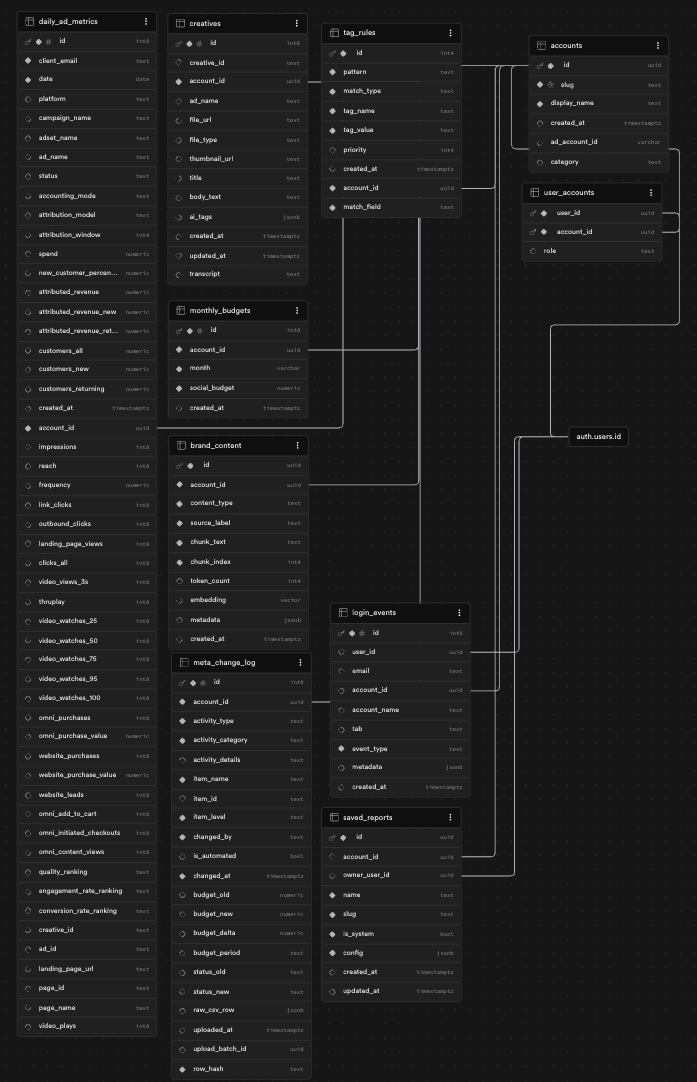
Claude has instructions on how each table works and is used and so when I ask a question, it filters down to the right data first then it pulls specific data, and then qualitatively analyzes with just the right data. No context window issue, no hallucination.
With that said, here are some example questions we are building on.
Example Question 1: Which rung is the leak
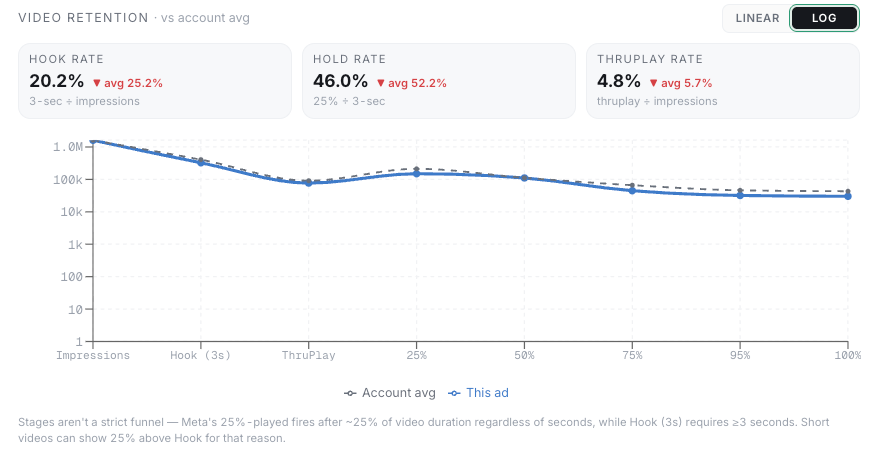
I can pull one ad, or a whole category, and see the full path from impression to purchase. Play, 3-second hook, holds at 25, 50, 75, 95, and 100 percent, click, landing-page view, add-to-cart, checkout, purchase. It flags the single biggest leak, weighted by spend.
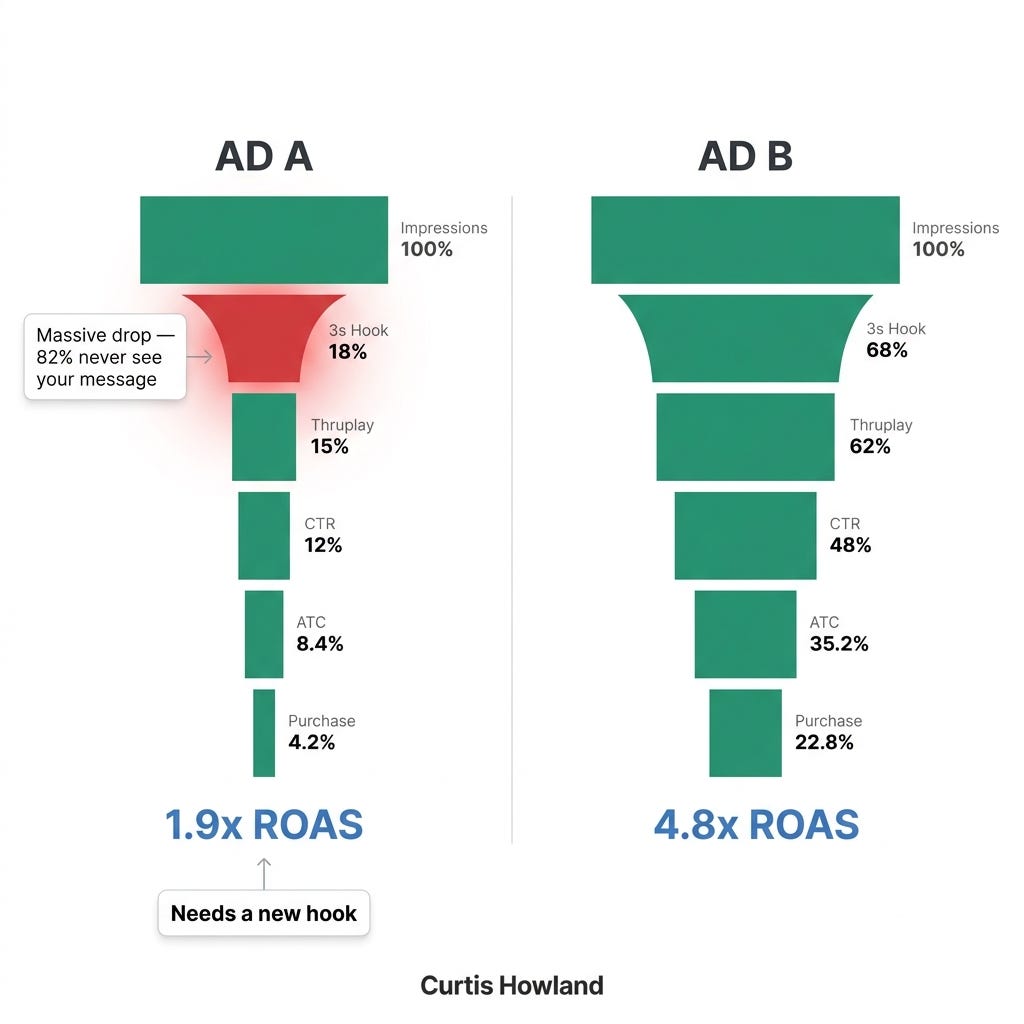
This is the difference between a guess and a diagnosis. A soft ROAS number tells you an ad is underperforming. The funnel tells you why. Great hook and no completion is a creative problem. Great completion and no add-to-cart is a landing-page or offer problem. Opposite fixes. You can only tell them apart if you kept every rung, and the SQL is what makes “show me the leak across these 40 ads” a five-second question.
In platform visual:
Question 2: Which specific creator actually drives results
The account knows who is on screen in every ad, with the timestamp of their first appearance in video. So I can ask “how do ads featuring this exact person perform” across the entire account and get a straight answer.
We still tag ads by creators in the name often, but this is helpful for accounts with 100’s of creators or inconsistent historical tagging.
Creators are one of the biggest levers you have, and “which one is actually working” is important.
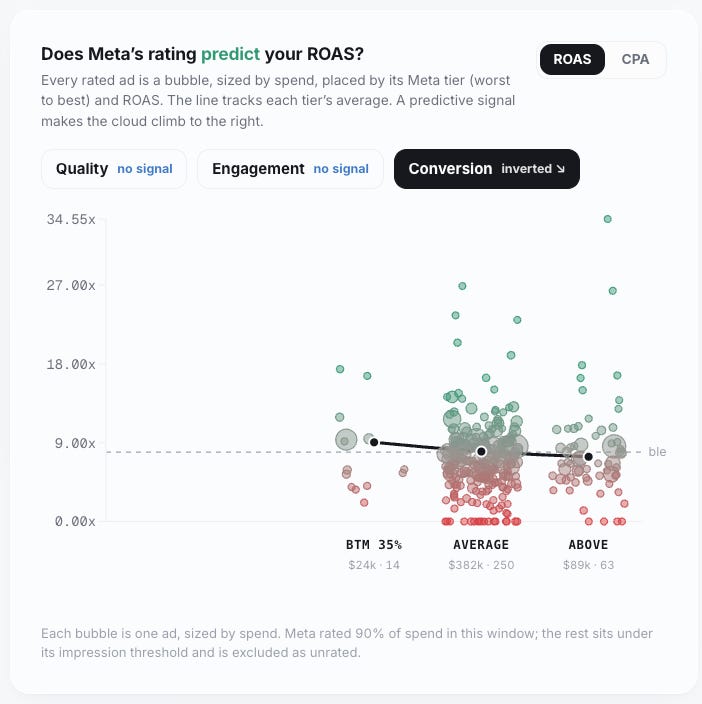
Question 3: Whether to even trust Meta’s ratings
I can correlate Meta’s own quality rankings against actual ROAS and CPA and get a verdict, per account: predicts, no signal, or inverted.
(To be honest, not a ton of insight but fun to analyze!)
Most importantly: Ask it anything, at once
Every one of those used to be a separate spreadsheet.
Now I open the database, talk to it in plain language, and say “go to this brand, pull the top ads in this category, tell me what’s working and what the selling points are, then send me the three best.” It writes the SQL, runs it, and comes back with a real answer.
I can move more quickly, dive deeper, and answer more this way.
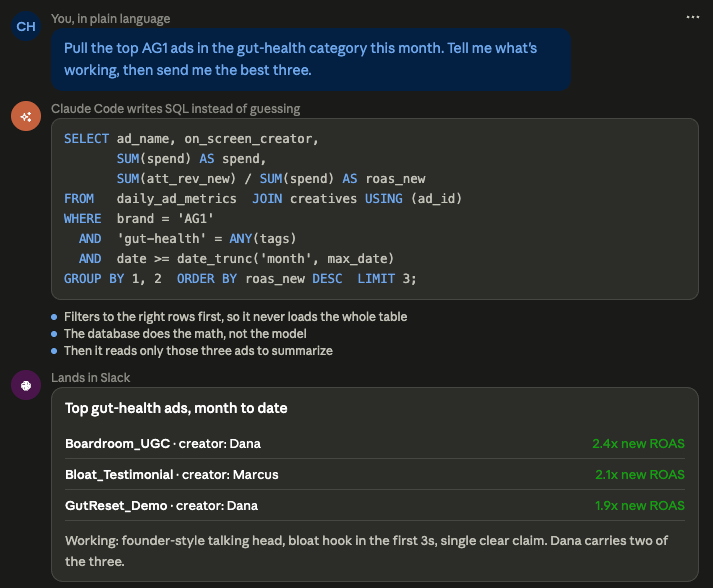
I still have to validate that it answered the right question, that the tests were set up right, and that the underlying data is right.
But that was true of spreadsheets as well. Bad data in = bad answers out.
Want to build it?
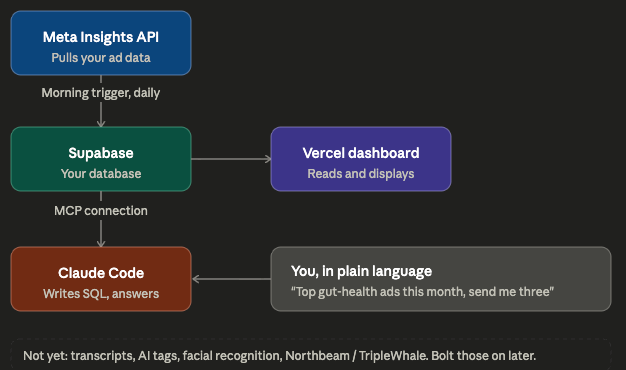
Ask Claude to help you build each piece. Just dump this article into Claude to start. That is genuinely how I would do it.
set up a daily Meta Graph API pull. Use Supabase as your database and a Supabase-based dashboard. You can build the dashboard with Claude, and use Claude Code to interact with both Supabase via MCP and the dashboard to update it.
Meta app set up is annoying but totally doable.
What to skip for now: transcriptions, visual descriptions, facial tagging, AI tags, & Northbeam or Triplewhale imports for different models.
Add those in later.
The middle version (add the creative intelligence). Layer in the AI tags so every ad is classified the same way without you typing it, and add transcripts and visual descriptions so the creative becomes searchable by what it says and shows. This is where you can start asking questions about angles and hooks across hundreds of ads, not just spend and clicks.
The full version (everything talking to everything). Add facial recognition to group by creator, and pipe in Northbeam or TripleWhale so the model is reasoning about incremental revenue, not just in-platform numbers.
You could skip all of this and just use an existing tool as well. That is a legitimate choice, and if that is your preference, there are plenty of good ones.
Just don’t split the middle and point claude at a huge spreadsheet. That’s where you will run into issues.
Liked this post? Share it with a friend or on Social! Thanks!